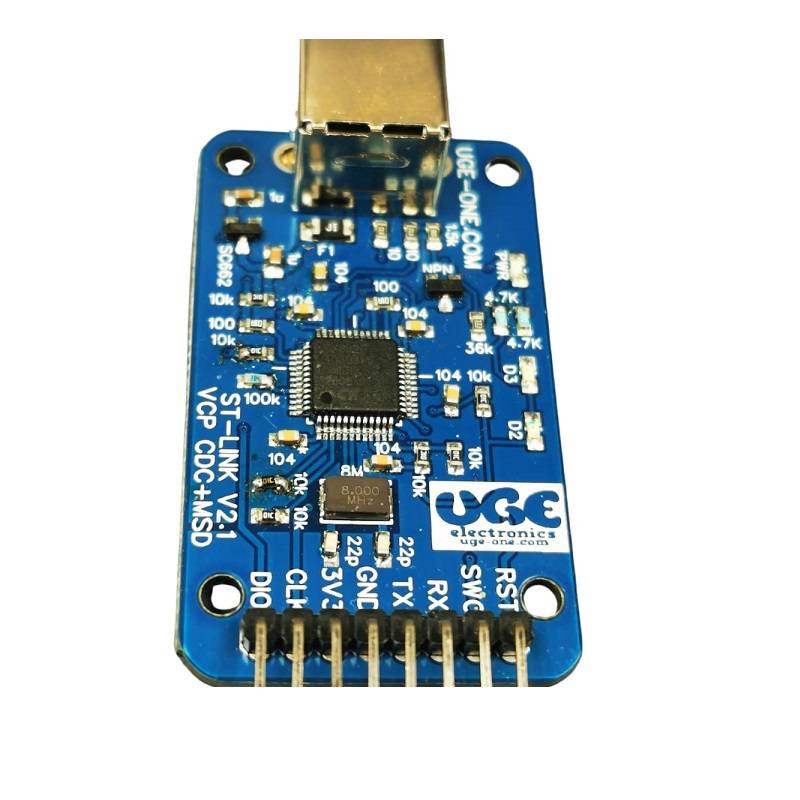
ST-Link V2.1 Debugger for STM32/STM8 Microcontrollers – Robust USB Type B Connection
Introduction:
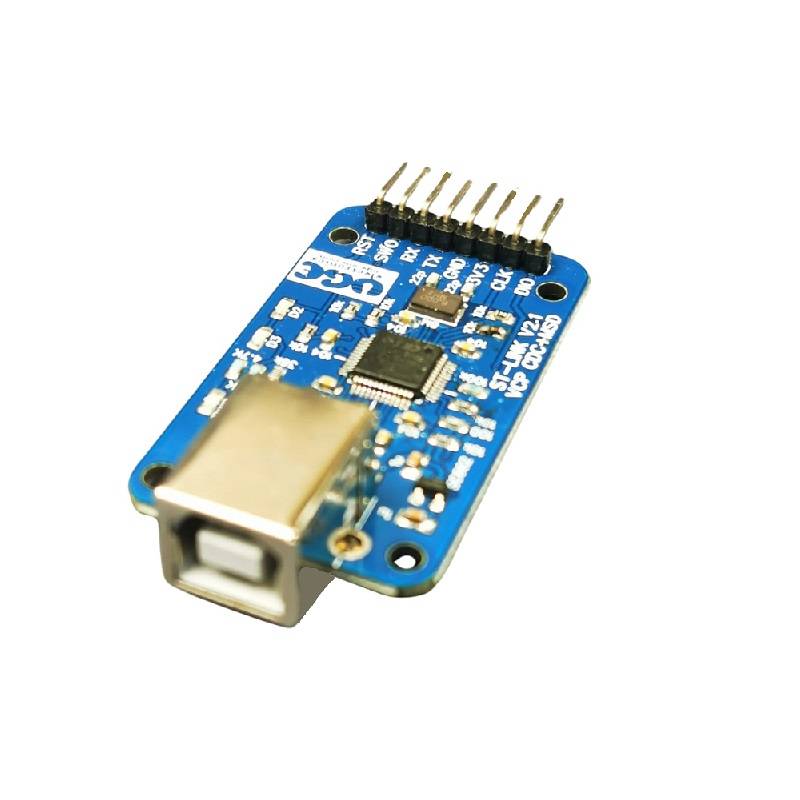
Empower your STM32 and STM8 microcontroller development with the reliable ST-Link V2.1 Debugger. Featuring a durable USB Type B interface, this powerful tool simplifies programming, debugging, and firmware updates, ensuring a stable connection throughout your development process. Ideal for both beginners and experienced engineers, the ST-Link V2.1 is an indispensable asset for any ARM microcontroller project.
Key Features & Benefits:
Extensive Microcontroller Support:
Benefit:Seamlessly programs and debugs a wide range of STM32 and STM8 family microcontrollers, offering broad compatibility for your projects.
Durable USB Type B Interface:
Benefit: Provides a robust and secure connection to your development PC, minimizing the risk of accidental disconnections during critical programming or debugging sessions.
Supports SWD Debugging for STM32:
Benefit: Enables efficient and high-speed debugging of STM32 microcontrollers using the Serial Wire Debug protocol.
3.3V Target Board Support:
Benefit: Directly compatible with common 3.3V target boards, simplifying connections and eliminating the need for external level shifters in many setups.
Future-Proof Firmware Upgradability:
Benefit: Ensures long-term compatibility with the latest STM32 development tools and software through easy firmware updates.
Clear LED Indicators:
Benefit: Provides visual feedback on power status and debugging activity, allowing for quick and easy identification of the debugger’s operational state.
Compact and Space-Saving Design:
Benefit: Its small form factor integrates effortlessly into any development environment without taking up excessive space.
Mass Storage for Easy Firmware Loading:
Benefit: Functions as a USB mass storage device, allowing you to simply drag and drop firmware files onto the debugger for flashing, streamlining the programming process.
Simplified Drag-and-Drop Programming:
Benefit: Offers a user-friendly drag-and-drop method for flashing firmware, making the process more intuitive, especially for new users.
Integrated Virtual COM Port:
Benefit: Provides a virtual COM port interface for UART communication with your target microcontroller, invaluable for debugging and data logging.
Plug-and-Play Convenience:
Benefit:Easily connects to your computer and is readily recognized by STMicroelectronics’ STM32CubeIDE and other compatible development tools, minimizing setup time.
Specifications:
Microcontroller Compatibility: STM32 and STM8 families
Interface: USB Type B
Debug Protocol (STM32): SWD (Serial Wire Debug)
Supported Target Voltage: 3.3V
Firmware: Upgradeable
LED Indicators: Power, Status
USB Cable Support: Standard USB Type B
Mass Storage Capability: Yes
Drag-and-Drop Programming: Yes
Virtual COM Port: Yes
Usage:
Connect to Your PC: Use a standard USB Type B cable to connect the ST-Link V2.1 debugger to your computer.
Install Drivers (If Necessary): Your operating system should automatically recognize the ST-Link V2.1. If prompted, you may need to install drivers (often provided by your IDE or available on STMicroelectronics’ website).
Connect to Your Target Board: Use appropriate jumper wires to connect the SWD (for STM32) or SWIM (for STM8) interface pins on the ST-Link V2.1 to the corresponding pins on your target microcontroller board. Ensure correct pinout connections (VCC, GND, SWDIO/DATA, SWCLK/CLK, RESET).
Launch Your Development Environment: Open your preferred IDE (e.g., STM32CubeIDE, Keil MDK, IAR Embedded Workbench) and configure it to use the ST-Link debugger.
Program and Debug: Utilize the IDE’s features to compile, flash, and debug your microcontroller code. The ST-Link V2.1 will facilitate the communication between your PC and the target device.
Firmware Updates: Periodically check for firmware updates for your ST-Link V2.1 within your IDE or on the STMicroelectronics website to ensure optimal compatibility and access to the latest features.
Mass Storage/Drag-and-Drop: In some cases, the ST-Link V2.1 will appear as a removable USB drive. You can copy firmware files (e.g., .hex or .bin) to this drive to program the microcontroller.
Virtual COM Port Usage: If your application uses UART communication, the ST-Link V2.1’s virtual COM port can be used to monitor or send data to your microcontroller via a serial terminal application on your PC.
Package Contents:
1 x ST-Link V2.1 Debugger for STM32/STM8 Microcontrollers (with USB Type B connector)
Brand
UGE Electronics
UGE Electronics
UGE Electronics
Reviews
There are no reviews yet.
Be the first to review “ST link V2.1 Debugger for ARM Microcontroller STM32 STM8 Family” Cancel reply






Reviews
There are no reviews yet.