Description
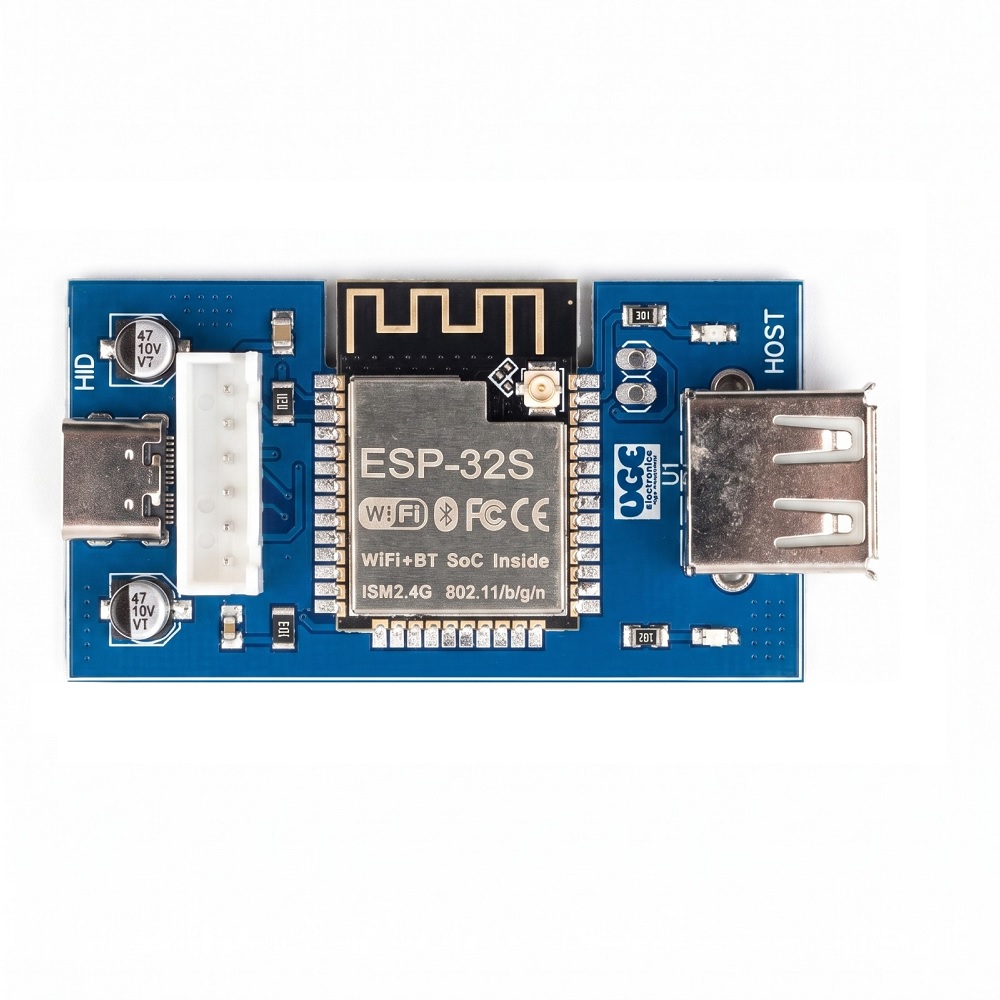
This board is a small USB bridge built around ESP32-WROOM-32.
A USB scanner or keyboard plugs into the USB-A host port (CH554). The ESP32 receives that data on UART and sends it to a CH9329, which appears to the computer as a normal USB keyboard. No driver is required on Windows, macOS, or Linux.
You program the ESP32 yourself. The included Arduino example prints host data on the serial monitor and types printable ASCII into the PC. Change the sketch to filter barcodes, add Wi-Fi, MQTT, or any protocol you need.
How it works
USB scanner / keyboard → USB-A host (CH554) → ESP32 GPIO16 @ 115200 → GPIO4 @ 9600 → CH9329 → PC HID keyboard
Features
- USB-A host for barcode scanners, HID keyboards, and similar devices
- Driver-free USB HID keyboard output to the PC (CH9329, ASCII mode)
- ESP32-WROOM-32 with Wi-Fi and Bluetooth
- Open Arduino example: host UART → Serial monitor + HID
- 6-pin programming header for a USB-TTL adapter
- Power LED and GPIO23 user LED
- 3.3 V LDO from USB 5 V
- https://github.com/UGEelectronics/ESP32-USB-Host-HID-Keyboard-Bridge
Specifications
What’s in the box
- 1× assembled ESP32 Host + HID board
- Arduino example (
ESP32_HostHID)
USB-TTL adapter, USB cables, and scanner are not included.
Typical uses
- USB barcode scanner → PC as keyboard wedge, with ESP32 in the middle
- Custom HID keyboard / kiosk input
- Wi-Fi or MQTT gateway that still types into a local PC
- Lab and industrial USB-host prototypes
Quick start
- Connect a USB-TTL adapter to the 6-pin header and flash
ESP32_HostHID.
- Plug the PC USB into the HID (CH9329) connector.
- Plug the scanner or keyboard into the USB-A host port (X2).
- Open Serial Monitor at 115200. Data is echoed there and typed on the PC.
Notes for buyers
- Flash ESP32-WROOM-32, not WROVER.
- Host baud must match the CH554 firmware (example: 115200).
- CH9329 ASCII mode types visible characters, Enter, Tab, and Backspace. Function keys need a firmware change.
Arduino UNO Rev3 by UGE Electronics





Reviews
There are no reviews yet.